
Top digital boards 2026
Professional recommendations from a Cheshire-based illustrator
🎨 Introduction
As a professional illustrator based in Cheshire, I create custom illustrations for books, branding, and digital media. Over the years, I've tested and researched various digital art tools to help fellow artists make informed decisions.
This guide covers the top-rated options for top digital boards 2026. Each product has been selected based on detailed research — examining verified customer reviews, technical specifications, pressure sensitivity, screen quality, and value for money. The recommendations reflect what I'd look for when advising clients and students on digital art equipment.
This page contains affiliate links. As an Amazon Associate, we may earn from qualifying purchases at no extra cost to you.
⏳ In a Rush? Our Top Picks
Based on detailed research and customer feedback, here are our award winners:


🏆 Recommended Products
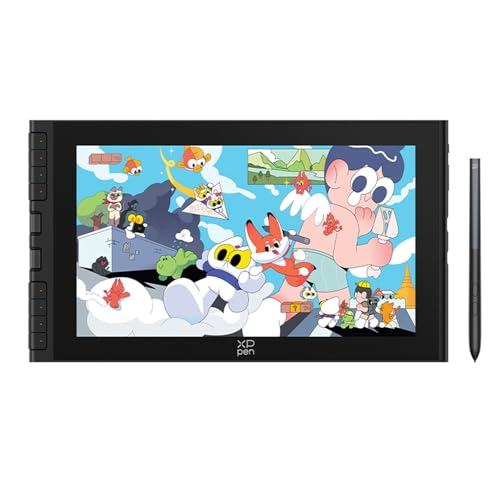
1. XPPen Artist Ultra 16
The XPPen Artist Ultra 16 is tailored for professional illustrators and digital artists who require precision and detail in their work. Its 15.6" 4K OLED display makes it particularly suited for intricate illustrations, detailed character designs, and high-resolution graphic work. It's ideal for those who work extensively in digital media and need a reliable device for rendering complex scenes or detailed branding assets. The tablet's high-resolution screen would also benefit illustrators working in publishing, where colour accuracy and detail are paramount.
✅ Pros
- 15.6" 4K OLED display for exceptional colour accuracy
- 8192 levels of pressure sensitivity for detailed line work
- Dual X3 Pro stylus enhances precision and control
- Compatible with major graphic design software
❌ Cons
- Slightly heavy, affecting portability
- Learning curve for setting up express keys
- Lacks USB-C connectivity
👁️ Quick Review Summary
⚡ Performance
The XPPen Artist Ultra 16 boasts a 15.6-inch 4K OLED display, providing vivid colours and deep contrasts, which is crucial for detailed artwork. It supports 8192 levels of pressure sensitivity, allowing for nuanced control over line thickness and opacity, essential for creating detailed illustrations. Customer feedback highlights the dual X3 Pro stylus's accuracy, which enhances precision in line work. The active area is sufficiently large for expansive creations, ensuring that artists have ample space to work without feeling constrained.
🎨 Design
Constructed with a sleek design, the XPPen Artist Ultra 16 is praised for its aesthetic appeal and professional look. It's built with high-quality materials that give it a sturdy feel, though some users mention it is slightly heavier than expected, affecting portability. Ergonomically, it offers a comfortable drawing experience, but prolonged use may require a stand to avoid wrist strain. The tablet's slim profile makes it relatively easy to fit into a work setup, though not as portable as smaller models.
🔌 Compatibility
The XPPen Artist Ultra 16 is compatible with both Windows and Mac systems, ensuring broad usability across different platforms. It offers driver support for popular software like Adobe Photoshop, Illustrator, and Clip Studio Paint, allowing seamless integration into existing workflows. The tablet includes customisable express keys, though some users report a learning curve in setting them up effectively. Connectivity is straightforward, but users note that a USB-C connection would enhance ease of use and reduce cable clutter.
💰 Value
Priced at £899.99, the XPPen Artist Ultra 16 offers a high-resolution display and advanced stylus features that justify its cost for professional illustrators who prioritise screen quality and precision. It's an excellent investment for those whose work demands these specifications. However, those with simpler needs or a tighter budget might find more cost-effective alternatives. Beginners or hobbyists may want to consider less expensive options that still offer decent performance.
🎯 Verdict
For professional illustrators prioritising screen quality and precision, the XPPen Artist Ultra 16 is a worthwhile investment, though it may be overkill for casual users.
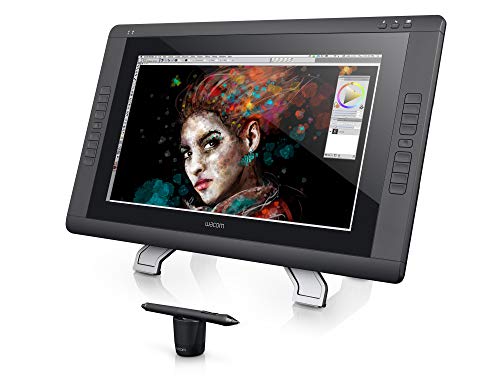
2. Wacom Cintiq 22HD Interactive Pen and Touch Display
The Wacom Cintiq 22HD is designed for professional illustrators and digital artists who require a reliable, large-screen display for tasks such as book illustrations, branding design, and digital media projects. Its expansive workspace is particularly suited for detailed work and long drawing sessions, making it ideal for those who spend significant time on digital illustration. It offers a direct, hands-on experience that can enhance precision for artists accustomed to traditional media.
✅ Pros
- Large active area of 19.5 x 11.5 inches
- 8192 pressure sensitivity levels for detailed work
- Adjustable stand for ergonomic use
- Compatible with major software like Photoshop and Illustrator
❌ Cons
- Heavy and not easily portable
- Occasional calibration drift reported
- Lacks HDMI connectivity
👁️ Quick Review Summary
⚡ Performance
This model boasts 8192 levels of pressure sensitivity, providing a nuanced drawing experience that allows for fine details and varied line work. The active drawing area measures 19.5 x 11.5 inches, offering ample space for intricate designs. Customer reviews highlight the pen's accuracy, though some note occasional calibration drift. The full HD 1920 x 1080 display delivers decent visual quality, though some users mention colour accuracy could be better, especially for print-focused projects.
🎨 Design
The Cintiq 22HD is constructed with durable materials, reflecting its professional-grade build. Its adjustable stand allows for ergonomic drawing angles, which is crucial for long projects. However, at 8.5 kg, portability is limited, making it more suitable for a dedicated workspace. The design is functional rather than sleek, prioritising practicality over aesthetic appeal, with some users noting the bezels are quite thick.
🔌 Compatibility
The device is compatible with major software such as Adobe Photoshop, Illustrator, and Clip Studio Paint, supported by reliable drivers that receive regular updates. It features express keys for custom shortcuts, although some users report a steep learning curve in setting them up. Connectivity includes DVI and USB ports, but it lacks modern HDMI support, which might require additional adapters for some setups.
💰 Value
At £800, the Wacom Cintiq 22HD offers a solid set of features for professional illustrators who prioritise a large, interactive workspace. It is a worthwhile investment for those who need precise control and a direct drawing experience. However, artists who require more portable solutions or advanced colour accuracy might consider other options. The price reflects its position as a professional tool rather than an entry-level device.
🎯 Verdict
The Wacom Cintiq 22HD is a dependable choice for illustrators needing a large, interactive display for detailed digital work, though it's best suited for a stable workspace.

3. UGEE UE16
The UGEE UE16 Graphic Drawing Tablet is well-suited for digital illustrators who work on detailed illustrations, such as book covers or digital media designs. With its sizeable 15.4-inch screen, it offers ample space for creating intricate artwork. It's particularly beneficial for artists who require a reliable and affordable drawing tablet for both professional and hobbyist projects. Those who rely on vibrant colour displays and precise pen input will find this tablet a fitting choice for their workflow.
✅ Pros
- 16K pressure sensitivity for detailed control
- 15.4-inch screen provides ample workspace
- Lightweight and portable design
- Customizable hotkeys improve workflow efficiency
❌ Cons
- Occasional calibration issues
- Lack of a built-in stand
- No multi-touch feature
👁️ Quick Review Summary
⚡ Performance
The UGEE UE16 boasts an impressive 16K pressure sensitivity, which allows for nuanced control over brush strokes, crucial for detailed illustration work. The active area of 15.4 inches provides a generous workspace. Customers report that the pen's accuracy is quite precise, enhancing the drawing experience. The screen quality is noted for its brilliant colour display, making it suitable for artists who need accurate colour representation. However, some users mention occasional calibration issues, which may require manual adjustment.
🎨 Design
According to customer feedback, the UGEE UE16 is lightweight, making it portable for artists who travel or shift between workspaces. The build materials, though predominantly plastic, are reported to be sturdy. Ergonomically, the device is comfortable for extended use, but some users have mentioned that the lack of a built-in stand can be inconvenient. Aesthetically, its sleek design is appealing, but the absence of a touch feature may be a downside for some.
🔌 Compatibility
The UGEE UE16 is compatible with major software such as Photoshop, Illustrator, and Clip Studio Paint, making it versatile for various digital art forms. Driver support is generally reliable, although a few users have experienced installation challenges on certain operating systems. The tablet features customizable hotkeys, which can enhance workflow efficiency. Connectivity is standard, with a USB-C connection ensuring a stable link to your computer.
💰 Value
Priced at £199.49, the UGEE UE16 offers a compelling range of features for the cost, particularly for budding professionals or students. Its pressure sensitivity and screen size make it a viable option for illustrators on a budget. However, those requiring advanced features like multi-touch or more robust build materials might need to look elsewhere. Overall, it provides good value for those prioritising core drawing functionalities over premium extras.
🎯 Verdict
For illustrators seeking a balance between affordability and functionality, the UGEE UE16 is a worthwhile consideration.

4. XP-PEN Artist 13
The XP-PEN Artist 13 (2nd Gen) is designed for illustrators and digital artists who are looking for an entry-level drawing tablet with a screen. Suitable for tasks such as book illustrations, branding projects, and digital media artwork, this tablet offers a compact solution for artists who need a portable yet functional device. It's particularly ideal for students or hobbyists who are beginning to explore digital art and require a reliable tool to practise and refine their skills.
✅ Pros
- 8192 levels of pressure sensitivity for precise control.
- Full-laminated screen reduces parallax.
- Lightweight and portable design.
- Compatible with multiple operating systems and major software.
❌ Cons
- Colour accuracy may not meet professional standards.
- Screen glare can be an issue in bright environments.
- Occasional driver installation issues reported.
👁️ Quick Review Summary
⚡ Performance
With 8192 levels of pressure sensitivity, the XP-PEN Artist 13 (2nd Gen) provides a responsive drawing experience that allows for fine control over line thickness and opacity. The active area measures 13.3 inches, offering ample space for detailed work. Customer reviews suggest that the X3 Elite Stylus is accurate, with minimal lag and good tilt recognition. The full-laminated screen reduces parallax, and the 1920x1080 resolution offers crisp visuals, although some users note that the colour accuracy could be improved for professional work.
🎨 Design
The tablet's design features a sleek black finish, and the build quality is generally well-received by users. It's lightweight and portable, making it suitable for artists on the move. However, some customers mention that the screen can be prone to glare in brightly lit environments. The ergonomic design includes a range of express keys, which can be customised to streamline workflow, although their placement may not suit all users.
🔌 Compatibility
The XP-PEN Artist 13 (2nd Gen) is compatible with Mac, Windows, Chromebook, and Android devices, offering flexibility for various users. It supports major software like Photoshop, Illustrator, and Clip Studio Paint. The drivers are generally stable, though some users have reported occasional issues with installation on certain systems. Connectivity is straightforward, with a single USB-C connection simplifying the setup process.
💰 Value
At £191.99, the XP-PEN Artist 13 (2nd Gen) offers good value for those entering the digital art world. It's a practical choice for students and hobbyists who need a functional screen tablet without breaking the bank. However, professional artists who require impeccable colour accuracy might consider higher-end alternatives. Overall, it's a solid choice for those prioritising affordability and basic functionality.
🎯 Verdict
A practical and affordable option for budding digital artists, the XP-PEN Artist 13 (2nd Gen) delivers reliable performance and portability, though professional illustrators may seek more advanced features.
5. XPPen Artist 12 3rd
The XPPen Artist 12 3rd Drawing Tablet is well-suited for budding illustrators and graphic designers who require a portable and affordable solution for digital art. Its compact size makes it ideal for those working on the go or in limited desk space environments. This tablet is particularly useful for creating detailed illustrations, educational purposes, and mobile creation tasks, offering a balance between functionality and cost-effectiveness for beginners and intermediates.
✅ Pros
- 16K pen pressure sensitivity for detailed work
- Compact and portable design
- Affordable price point for beginners
- Compatible with major design software
❌ Cons
- Occasional driver issues reported
- Plastic components can feel cheap
- Screen size may be limiting for large projects
👁️ Quick Review Summary
⚡ Performance
With 16K pen pressure sensitivity and an 11.9-inch FHD display, the XPPen Artist 12 offers a responsive drawing experience. Customer feedback highlights the accuracy of the pen, with the 8192 pressure levels allowing for nuanced line work. The full HD screen provides good colour accuracy, though some users have noted minor issues with parallax. The active area is ample for most tasks, but may feel cramped for those accustomed to larger working spaces.
🎨 Design
The build quality of the XPPen Artist 12 is solid, with a sleek, lightweight design that enhances its portability. The materials feel durable, though some users have mentioned that the plastic components can feel slightly cheap. Ergonomically, the tablet is comfortable to use for extended periods. The X-Dial and express keys are strategically placed, improving workflow efficiency, although some users find the dial takes time to get used to.
🔌 Compatibility
The XPPen Artist 12 supports Windows and macOS, and is compatible with major software such as Photoshop, Illustrator, and Clip Studio Paint. The driver installation is straightforward, though a few users have reported occasional driver issues requiring reinstalls. Connectivity is via a USB-C cable, ensuring a stable connection, while the express keys and X-Dial offer customisable shortcuts that can significantly speed up the creative process.
💰 Value
At £189.99, the XPPen Artist 12 offers excellent value for those starting in digital illustration or seeking a secondary, portable device. Its feature set justifies the price for beginners and intermediates, though professionals might find the screen size limiting for more extensive projects. If portability and budget are priorities, this tablet is a strong contender; otherwise, more advanced users might consider larger or higher-end models.
🎯 Verdict
For illustrators seeking a budget-friendly and portable drawing solution, the XPPen Artist 12 is a compelling choice, though it may not satisfy the needs of more demanding professionals.

6. UGEE U1600
The UGEE U1600 Drawing Tablet is particularly suited for budding illustrators and graphic designers who require a budget-friendly drawing monitor. It caters well to those involved in digital media and book illustrations, providing a decent screen size for detailed work. Given its compatibility with various operating systems, it's an attractive entry-level option for artists exploring digital illustration without breaking the bank.
✅ Pros
- Affordable price for a screen tablet.
- 8192 levels of pressure sensitivity.
- Compatible with multiple operating systems.
- Full HD display with 90% NTSC colour coverage.
❌ Cons
- Occasional driver issues, especially on Mac.
- Lacks built-in express keys for shortcuts.
- No included stand affects ergonomics.
👁️ Quick Review Summary
⚡ Performance
The tablet features 8192 levels of pressure sensitivity, which should provide a good range of line variation for detailed work. The 15.4-inch full HD screen with 90% NTSC colour coverage offers vibrant and accurate colours, crucial for professional-grade illustrations. Customers appreciate the pen's accuracy, noting minimal lag, which is essential for precise work. The active area is ample, providing a comfortable space for most drawing tasks.
🎨 Design
Reviews suggest the UGEE U1600 has a solid build, though it is primarily plastic, which helps keep the weight down for portability. Its design is straightforward, focusing on functionality over aesthetics. The screen is anti-glare, aiding visibility during long drawing sessions, but some users note the absence of a stand, which may affect ergonomics if not addressed with external accessories.
🔌 Compatibility
The tablet supports Windows, Mac, Chrome OS, Android, and Linux, offering broad compatibility. It works well with major software like Photoshop, Illustrator, and Clip Studio Paint, a critical factor for many artists. However, some users report occasional driver issues, particularly with Mac systems, which could disrupt workflow. The lack of express keys might be a drawback for those who rely on shortcuts.
💰 Value
At £179.99, the UGEE U1600 offers good value for those new to digital art or on a tight budget. Its features are robust enough for beginners and intermediates, though professionals might find it lacking in terms of advanced customisation options and additional features. Those needing superior build quality or more advanced features might look elsewhere.
🎯 Verdict
For illustrators seeking an economical entry into screen tablets, the UGEE U1600 offers a commendable balance of features and performance, though it may require some compromises in ergonomics and customisation.

7. HUION Kamvas 13
The HUION Kamvas 13 is tailored for illustrators who require a portable yet capable device for creating digital art, particularly those working on book illustrations, branding projects, and digital media. Its compatibility with Android devices makes it an appealing choice for artists who need flexibility in their workflow. The compact size is ideal for those who frequently work on the go or have limited desk space, while still providing a screen large enough to handle detailed work.
✅ Pros
- 8192 pressure levels for precise control
- Compatible with Android devices
- Lightweight and portable design
- Customisable express keys
❌ Cons
- Screen glare in bright environments
- Occasional driver issues
- Limited screen size for complex projects
👁️ Quick Review Summary
⚡ Performance
The Kamvas 13 features 8192 levels of pressure sensitivity, which provides precise control over line thickness and opacity, essential for detailed illustration work. The active area of the screen measures 13.3 inches, offering ample space for most tasks. Customer feedback highlights the pen's accuracy, bolstered by Huion's Pen Tech 3.0, which eliminates the need for batteries. The screen boasts a 1920x1080 resolution with vibrant colours, though some users note occasional glare in bright environments.
🎨 Design
Constructed with durable materials, the Kamvas 13 is designed for portability, weighing approximately 980g. Its ergonomic design includes a slight incline, which many users find comfortable for long drawing sessions. The violet purple finish adds a touch of personalisation and aesthetic appeal. Customer reviews generally praise its lightweight and slim profile, making it easy to carry in a backpack or laptop bag.
🔌 Compatibility
The Kamvas 13 offers broad compatibility, working well with popular software such as Adobe Photoshop, Illustrator, and Clip Studio Paint. The device supports both Windows and macOS, and its ability to connect to Android devices via USB-C is a standout feature. However, some users report occasional driver issues, which can affect performance. The tablet includes six express keys that can be customised for shortcuts, enhancing workflow efficiency.
💰 Value
Priced at £179.55, the Kamvas 13 offers good value for artists seeking a capable drawing tablet with a screen. Its features justify the price, especially for those needing Android compatibility. Beginners and hobbyists will find it a solid investment, while professionals requiring larger screens or higher-end features may need to explore other options. Overall, it strikes a balance between cost and functionality suitable for many digital artists.
🎯 Verdict
The HUION Kamvas 13 is a versatile and affordable option for illustrators needing a portable drawing tablet with screen, though it may not suit everyone due to occasional driver issues and screen size limitations.

8. One by Wacom CTL-672 Medium Drawing Graphic Tablet
The One by Wacom CTL-672 Medium Drawing Tablet is geared towards beginners and hobbyists in digital illustration. It's suitable for those working on basic sketches, simple illustrations, and light graphic design projects. Given its cost-effective nature, it's ideal for students or artists transitioning from traditional to digital mediums, looking to experiment with digital art without a hefty investment.
✅ Pros
- Affordable price point
- Compatible with major software
- Lightweight and portable
- Accurate pen with minimal lag
❌ Cons
- Limited pressure sensitivity
- No tilt sensitivity
- Occasional driver issues
👁️ Quick Review Summary
⚡ Performance
The tablet features 2048 levels of pressure sensitivity, which is sufficient for basic drawing tasks, though less than the 8192 levels found in more advanced models. The active area measures 216 x 135 mm, providing ample space for medium-scale artwork. Customer feedback suggests the pen is accurate with minimal lag, though it lacks tilt sensitivity, which may limit nuanced shading techniques.
🎨 Design
Constructed from durable plastic, the tablet is lightweight and portable, making it convenient for artists on the go. Reviews note its ergonomic design, which is comfortable for extended use, though some users find the lack of a screen a drawback. Its simple, matte black finish is understated but professional, appealing to those who prefer a minimalist aesthetic.
🔌 Compatibility
The One by Wacom is compatible with both Windows and macOS, and works seamlessly with major software like Adobe Photoshop, Illustrator, and Clip Studio Paint. The absence of express keys might be a limitation for those accustomed to shortcut buttons. Connectivity is straightforward via USB, though some users report occasional driver issues, requiring reinstallation.
💰 Value
At £68.83, this tablet offers good value for beginners and those on a budget. Its features justify the price for basic illustration tasks. However, professional artists requiring advanced capabilities such as higher pressure sensitivity or tilt recognition might find it lacking. It's an economical choice for novices, but experienced illustrators may need to look elsewhere.
🎯 Verdict
For beginners and hobbyists, the One by Wacom CTL-672 offers a practical entry into digital art, though it lacks the advanced features required by professional illustrators.

9. Wacom Intuos S Black –
The Wacom Intuos S is ideal for budding illustrators or students who need a reliable entry-level drawing tablet. It's particularly suited for sketching, digital illustrations, and basic graphic design tasks. Given its compact size and affordability, it's an excellent choice for those who require a portable device for remote working or casual art creation. While it may not satisfy professional needs for detailed work, it offers a practical starting point for those exploring digital art.
✅ Pros
- Affordable entry-level option.
- Compact and portable for easy transport.
- Battery-free pen reduces maintenance.
- Compatible with major operating systems and software.
❌ Cons
- Limited active area for larger projects.
- Initial driver setup can be challenging.
- No wireless connectivity options.
👁️ Quick Review Summary
⚡ Performance
The Wacom Intuos S features 4096 levels of pressure sensitivity, allowing for decent line variation and control, suitable for sketching and light illustration tasks. The active area of 152 x 95 mm offers enough space for small-scale projects but may feel constrained for larger works. Customer feedback suggests the pen is accurate and responsive, though some users note a slight lag when used with more demanding software. The absence of a built-in screen means a direct reliance on the connected computer's display.
🎨 Design
Constructed from durable plastic, the Wacom Intuos S is lightweight and portable, making it easy to carry in a laptop bag. Its compact form factor is ergonomic for smaller desks and travel, although its small size might be less comfortable for prolonged use compared to larger models. The minimalist black design is unobtrusive and professional, though it lacks the premium feel of higher-end tablets. The pen is battery-free, reducing maintenance concerns.
🔌 Compatibility
Compatible with Windows, Mac, and Android, the Intuos S offers broad versatility. It supports major software like Photoshop, Illustrator, and Clip Studio Paint, though some users report initial driver setup can be finicky. The tablet includes four customisable express keys, which enhance workflow efficiency. Connectivity is straightforward with a USB cable, but the lack of wireless options could be limiting for users seeking more flexibility.
💰 Value
At £56.00, the Wacom Intuos S offers good value for beginners or casual illustrators seeking a reliable entry-level tablet. It's an affordable way to experiment with digital art without a significant investment. However, those requiring a larger working area or more advanced features might find it lacking. Professionals or users seeking more robust performance should consider investing in higher-tier models.
🎯 Verdict
For amateur illustrators or those on a budget, the Wacom Intuos S is a practical starting point, though professionals may need more advanced features.
10. GAOMON M1220 12 Inch
The GAOMON M1220 is well-suited for beginner to intermediate digital illustrators, particularly those working in book illustration, brand design, and digital media. Its 12-inch active area accommodates detailed work without overwhelming new users. The tablet is ideal for those transitioning from traditional to digital art or for artists needing a budget-friendly option for creating illustrations and sketches.
✅ Pros
- 8192 levels of pressure sensitivity for precise control
- Wide compatibility with major operating systems and software
- Affordable price point for beginners
- Lightweight and portable design
❌ Cons
- No built-in screen, requiring monitor use
- Potential driver issues on Mac OS
- No built-in stand, affecting ergonomics
👁️ Quick Review Summary
⚡ Performance
With 8192 levels of pressure sensitivity, the GAOMON M1220 promises nuanced control over line thickness and opacity, crucial for detailed illustrations. The active area measures 10 x 5.63 inches, providing ample space for drawing. Customers generally find the pen accuracy reliable, though some mention occasional jitter. Without a screen, it relies on monitor mirroring, which might not suit those accustomed to direct drawing displays.
🎨 Design
Constructed from durable plastics, the GAOMON M1220 is lightweight and portable, making it convenient for illustrators on the move. The ergonomic design, with a slight incline, aids in reducing wrist strain during prolonged sessions. Aesthetically, it sports a minimalist look, which some users find appealing. However, the absence of a built-in stand might necessitate additional support for optimal comfort.
🔌 Compatibility
The GAOMON M1220 supports Windows, Mac OS, and Android, widening its usability. It works well with major software like Photoshop, Illustrator, and Clip Studio Paint. The 13 multimedia keys and 8 customisable shortcut keys enhance workflow efficiency. However, some users report driver installation hiccups, especially on Mac OS, which might require troubleshooting.
💰 Value
Priced at £49.99, the GAOMON M1220 offers good value for its features, particularly for students or hobbyists. Its performance and functionality justify the cost for those beginning their digital art journey. Professional illustrators seeking advanced features or a screen might consider other options. For those on a budget, it’s a solid choice.
🎯 Verdict
The GAOMON M1220 is a practical choice for budding illustrators seeking an affordable entry into digital art, but professionals may desire more advanced features.
📖 Buying Guide
When choosing a drawing tablet or pen display, consider these key factors:
- Screen Quality: Full HD (1920x1080) minimum for professional work. Look for 90%+ sRGB colour gamut. Full lamination reduces parallax for better accuracy.
- Pressure Sensitivity: Look for 8192 levels for professional work. 4096 levels work well for beginners. Higher sensitivity allows for more nuanced brush strokes and line variation.
- Screen Size: 13-16" portable for travel, 22-24" ideal for studio work. Larger screens reduce eye strain and allow for detailed illustration work.
- Connectivity: USB-C offers single-cable solution. HDMI + USB more universal. Check if your computer supports the required connections.
- Stand & Ergonomics: Adjustable stand (15-90°) prevents neck strain. Anti-glare coating reduces eye fatigue during long sessions.
- Software Compatibility: Ensure driver support for your OS (Windows, Mac, Linux). Check compatibility with your preferred software (Photoshop, Illustrator, Clip Studio Paint, etc).

About the Reviewer
Every Big Red Illustration review is written by illustrator and agent Jamie Conner, drawing on over 30 years of combined professional experience in traditional art, digital tools, and the wider creative industry.
Here's what he has to say…
I'm Jamie Conner, a UK-based illustrator and illustrator agent with a background in character-focused and expressive artwork. My training began at Newcastle-under-Lyme College and continued at Nottingham Trent University, where I developed a strong foundation in illustration.
I now split my time between creating my own work and representing artists, supporting them with commissions, opportunities, and navigating the wider creative industry. I also review digital and traditional art products, offering clear, practical insights to help artists choose tools that suit their workflow.
Whether I'm illustrating, advising artists, or reviewing products, my work is driven by a genuine commitment to the craft of illustration and to the wider creative community.